Settings guide
Time clock settings
Configure early starts, rounding, grace, geofence, and auto clock-out.
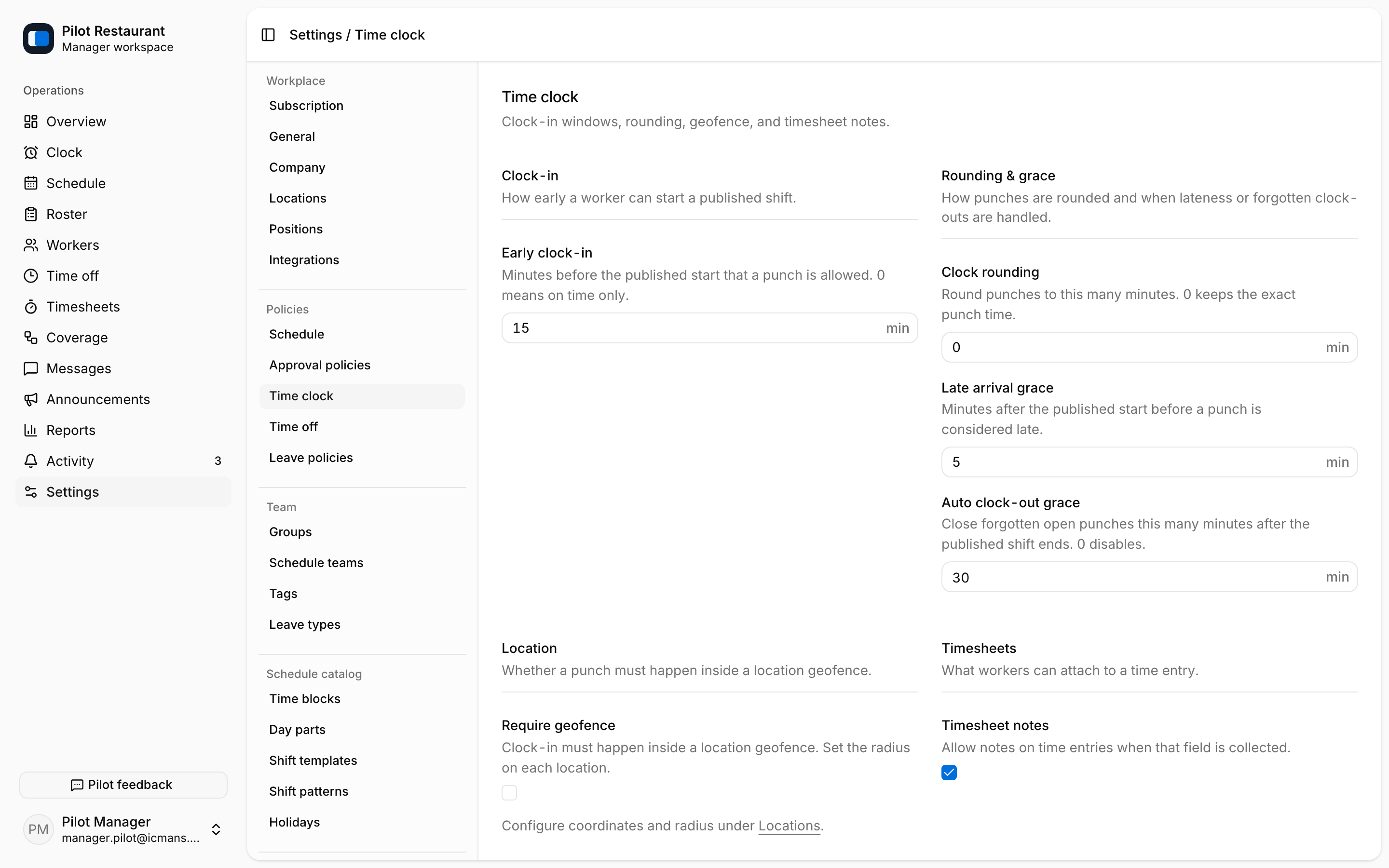
Time clock settings determine when and where Workers can start Time Entries and how punches are read:
- Early clock-in — how many minutes before a published Shift a Worker may clock in.
- Clock rounding — round punch times to the nearest number of minutes, or keep them exact.
- Late arrival grace — minutes after the Shift start that still do not count as late.
- Auto clock-out grace — minutes after the Shift end before an open entry is closed automatically.
- Require geofence — clock-ins must be within the Location radius; the radius itself is set per Location.
- Timesheet notes — allow notes on Time Entries.
The shared Kiosk is not configured here: its Location PIN belongs to each Location, the Worker PIN to each Worker's Employment page, and the clock itself lives at /kiosk.
Before enabling geofence, verify each Location's coordinates and radius and tell Workers why location permission is needed. Always provide a Manager path for legitimate device or location failures.
Policy changes should be tested on a non-critical Shift. Managers can correct a punch with a reason from the Schedule's shift editor, and corrections appear in operational history.